

TON Timer in Sysmac Studio: Complete On-Delay Programming Guide
Master the TON (On-Delay) timer in Omron Sysmac Studio: Ladder and Structured Text syntax, timing charts, runtime PT modifications, and industrial debouncing field notes.
The TON (On-Delay Timer) instruction in Sysmac Studio delays energizing an output (Q = TRUE) for a specified preset duration (PT) after its input condition (In) turns TRUE. Standardized under IEC 61131-3 across the Omron NJ/NX machine controller family, TON is the primary timing block used in machine automation for sensor debouncing, motor star-delta starter transitions, pneumatic travel verification, and sequential interlocks.
Technical Specifications and Timer Matrix
| Parameter / Feature | Value / Specification | Notes |
|---|---|---|
| Controller Families | Omron NJ101, NJ301, NJ501, NX102, NX1P2 | All Sysmac MAC platforms |
| Instruction Standard | IEC 61131-3 Standard Timer | On-Delay Function Block |
| Languages Supported | Ladder Diagram (LD), Structured Text (ST) | Deterministic cycle evaluation |
Input Variable (In) | BOOL | Starts timing on rising edge (FALSE → TRUE) |
Preset Time (PT) | TIME (T#0ms to T#106751d_23h_47m_16s_854.775807ms) | Resolution: 1 ns (evaluated per task period) |
Output Variable (Q) | BOOL | Stays FALSE until ET = PT, then switches to TRUE |
Elapsed Time (ET) | TIME | Accumulator tracking elapsed time from T#0s to PT |
Sysmac Studio Timer Comparison Matrix
| Timer Type | Output Turn-ON Condition | Output Turn-OFF Condition | Primary Industrial Application |
|---|---|---|---|
| TON (On-Delay) | Delays ON by PT after In goes TRUE | Immediately when In goes FALSE | Sensor debouncing, cylinder travel verification |
| TOF (Off-Delay) | Immediately when In goes TRUE | Delays OFF by PT after In goes FALSE | Cooling fan overrun, conveyor clearing |
| TP (Pulse Timer) | Immediately on rising edge of In | Fixed duration PT, independent of In | Pneumatic blow-off, camera strobe pulses |
| AccumulationTimer | Accumulates time whenever In is TRUE | Resets via dedicated Reset input | Operating hours monitoring, tool life tracking |
Programming TON: Ladder Diagram vs. Structured Text
Sysmac Studio allows creating TON timer instances in either graphical Ladder rungs or Structured Text routines:
Ladder Diagram Implementation
In Ladder Diagram, assign a dedicated tag of data type TON (e.g., TON_Instance):
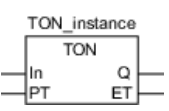
Structured Text (ST) Syntax
In Structured Text routines, call the instance and map its inputs and outputs:
// TON Timer Invocation in Structured Text
TON_Instance(
    In := Sensor_Detect,    // BOOL: Execution condition
    PT := T#2s,             // TIME: 2-second delay preset
    Q  => Actuator_Enable,  // BOOL: Output delayed flag
    ET => Current_ET        // TIME: Elapsed time monitor
);
Parameter Reference Table
| Variable | Direction | Data Type | Meaning | Operational Rule |
|---|---|---|---|---|
| In | Input | BOOL | Timer Input | TRUE starts timing. FALSE resets ET to 0 and turns Q to FALSE. |
| PT | Input | TIME | Preset Time | Delay duration. Uses the T# format: T#500ms, T#2s, T#1h. |
| Q | Output | BOOL | Timer Output | Switches to TRUE when ET >= PT. Stays TRUE until In drops. |
| ET | Output | TIME | Elapsed Time | Current elapsed duration since In became TRUE. |
Operational Mechanics: Normal vs. Interrupted Execution
Understanding the difference between full timing completion and interrupted input signals is fundamental to machine reliability:
Scenario 1: Normal Full-Cycle Timing
In the example below, a 5-second TON timer is monitored. When input contact A turns TRUE, elapsed time accumulator def starts counting. When def reaches 5 seconds, output abc energizes. When contact A drops to FALSE, output abc de-energizes immediately and def resets to zero.

Scenario 2: Interrupted Cycle (Early Drop of Input)
What happens if contact A drops to FALSE before the 5-second preset time expires? In the GIF below, contact A goes FALSE at approximately 4 seconds. The timer immediately aborts, elapsed time def is cleared to zero, and output abc never energizes.

Detailed Timing Diagram
The timing chart below illustrates the exact behavior of In, Q, and ET in Sysmac Studio:

Key timing principles:
- When
Intransitions toTRUE,ETbegins incrementing each task period. - When
ETreaches set timePT,Qtransitions toTRUEandETstops incrementing. - When
Intransitions toFALSE,ETresets to0andQtransitions toFALSE. - If
Intransitions toFALSEbeforeETreachesPT, the timer resets immediately.
Dynamic Runtime Preset Time (PT) Modification
If PT is dynamically altered (e.g., from an HMI recipe or formula) while In is already TRUE:
| Current Timer State | Output Q State | New PT Value | Controller Action |
|---|---|---|---|
Timing Complete (ET = PT) | TRUE | Any value | Q remains TRUE. ET remains unchanged at the previous value. |
Timing in Progress (ET < PT) | FALSE | PT_new >= ET | Timing continues until reaching PT_new. |
Timing in Progress (ET < PT) | FALSE | PT_new < ET | Output Q transitions to TRUE immediately. |
Field Notes & Practical Engineering Tips (“Saha Notu”)
Practical engineering tips learned from machine commissioning on factory floors:
- Optical & Proximity Sensor Debouncing: In high-speed packaging applications, vibrations and mechanical bounce can create false triggers. A TON timer with
PT := T#10msorT#20msplaced immediately after the physical input effectively filters noise spikes. - Motor Star-Delta Transition Delay: When transitioning between star and delta contactors in large conveyor drives, always interlock the delta contactor through a TON delay (
T#80mstoT#120ms) to guarantee the star contactor’s physical arc has fully extinguished before delta energization. - Do Not Enclose TON in Conditional Blocks: Never place a TON instance inside a conditionally executed
IFstatement,CASEbranch, or action block. When the conditional block is bypassed, Sysmac Studio will not scan the timer, causing the internal accumulator to freeze or exhibit erratic behavior when re-entered. Always run the timer unconditionally in the main task and conditionally evaluate itsQoutput instead. - Sysmac Jitter & Task Cycles: Sysmac Studio evaluates timer instances during each primary task execution. While the internal timer counter has 1 ns resolution, jitter between task periods is typically bounded between
-100 nsand+(100 ns + 1 task period). For sub-millisecond precision, use high-speed interrupt tasks or EtherCAT Distributed Clock (DC) timestamping. - Fault Diagnostic: If an unexpected timer condition causes a cycle time fault or task overrun, look up the hexadecimal controller code with the Omron Sysmac Error Code Lookup tool.
Related Guides
Frequently Asked Questions
How does the TON timer work in Sysmac Studio?
The TON (On-Delay Timer) starts timing when input In becomes TRUE. Once elapsed time (ET) reaches preset time (PT), output Q transitions to TRUE. If In becomes FALSE at any time, ET resets to zero immediately and Q drops to FALSE.
What is the syntax for preset time (PT) in Sysmac Studio?
Preset times use the IEC 61131-3 TIME literal prefix: for example, T#2s for 2 seconds, T#500ms for 500 milliseconds, or T#1m for 1 minute. The maximum allowable duration is T#106751d_23h_47m_16s_854.775807ms.
What happens if the input goes FALSE before the TON timer reaches PT?
If input In transitions to FALSE before ET reaches PT, the timer aborts, ET resets to zero immediately, and output Q never turns TRUE.
Can a TON timer be called inside a conditional subroutine or CASE block?
Calling TON inside conditional blocks is strongly discouraged. If the block is not scanned, the timer accumulator freezes, missing time intervals and causing unpredictable machine sequences upon reactivation.
What is the timing accuracy and jitter of TON in Omron NJ/NX controllers?
The internal timing accuracy is 1 ns, and execution is evaluated once per primary task period. The timing jitter is bounded between -100 ns and +(100 ns + 1 task period).